


Any.do - To do list & Calendar
4.436.07K Reviews
App Specs
- Version
- Varies with Device
- Updated On
- License
- Free
- Downloads
- 10,000,000+
- Developer
- Any.do To-do list & Calendar
- Categories
- Productivity
- Platform
- Android
Screenshots
 Analysis by AppCompare
When I use a planner, I want it to help me decide what deserves attention now—not just give me another place to collect unfinished tasks. Any.do - To do list & Calendar brings tasks and calendar planning together, which can make everyday organizing feel more manageable when appointments and to-dos compete for the same time. Its main strength is this joined-up approach; whether it suits you depends on how much structure you want and whether you’ll keep your lists current.
What to expect when you open it
The app is free to start, with optional in-app purchases, and it comes from Any.do To-do list & Calendar. It is a productivity app for a broad audience: it has an Everyone content rating and has been available since November 10, 2011. Its average rating is 4.4 from around 503,000 ratings, with roughly 36,000 written reviews and over 10 million installs. Those figures suggest it has found a large audience, but they don’t tell you whether its planning style fits your habits.
In my view, the key question is whether you want tasks and calendar commitments visible in one planning routine. If you already maintain a calendar but scatter errands, reminders, and project steps across notes, messages, and memory, bringing those pieces together may reduce the effort of checking several places. If all you need is a bare checklist, the additional planning layer may feel like more app than you need.
How quickly it gets out of your way
For a task app, perceived speed is less about a stopwatch and more about how many decisions it asks of me before I can capture an idea. The straightforward setup and uncluttered interface described in my experience make it easy to begin adding tasks without first designing a complicated system. That matters when a reminder occurs to me between other activities: if capturing it feels like work, I’m more likely to forget it.
The trade-off is that an easy first task does not automatically make a useful long-term plan. Once lists grow, I need to be deliberate about deadlines, subtasks, and what belongs on today’s schedule. I get the best results when I treat the app as a place to make small planning decisions, rather than dumping every thought into one long list and expecting the calendar to sort it out.
When the workload gets busy
Any.do’s task and calendar combination is most useful when a busy day contains both fixed appointments and flexible work. I can use a calendar event as a boundary, then break a larger task into smaller steps and decide where those steps might fit. The Daily Planner’s morning prompt offers a natural moment to make that choice. I would not treat a suggested plan as an automatic answer, though: priorities still need a human check, especially when a deadline or appointment has changed.
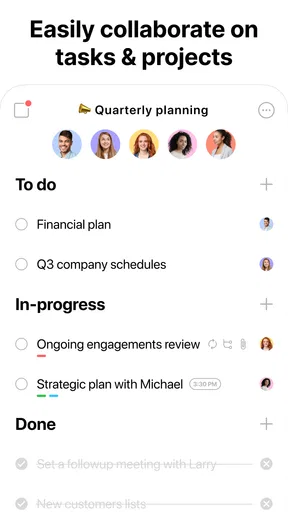
Shared lists also have a practical role beyond formal teamwork. For a household, a trip, or a small group project, putting responsibilities in a common place can make it easier to see what is still outstanding. The useful habit is to assign or clarify ownership while creating the task. A shared list that says what needs doing but leaves everyone guessing who will do it can create confusion rather than prevent it.
Worth Reading Before You Choose

Flipboard Shows What News Apps Must Do Beyond the Feed

Switching to Android Auto Means Rethinking Your Driving Routine

Google Calendar Makes a Crowded Week Easier to Manage

Ludo King Makes the Most of the Minutes Between Plans

Baby Panda World Brings Quick Play to Modern Phones, but Its Game Library Feels Busy

ESPN’s Live Game View Makes Following Close Games Easier
Reliability depends on the routine
I find reminders most valuable when they are specific enough to prompt an action. “Prepare for tomorrow” is easy to ignore; a task broken into a couple of concrete steps gives me a clearer starting point. Subtasks help here, and they also make larger projects feel less like a single intimidating checkbox. The app can support a reliable routine, but it cannot decide which tasks are realistic or keep an outdated list from becoming noisy.
Calendar syncing can help reduce the gap between appointments and task planning, but I would still review the result after connecting a calendar. The original account of using Google Calendar found appointments and reminders appearing alongside tasks, which is useful context for people who already rely on that calendar. For any connected schedule, I recommend checking that the view makes sense before trusting it as the only place you look; an organized screen is helpful only if it reflects the commitments you actually need to manage.
Device fit and everyday friction
The app’s minimum operating-system requirement is version 7.0, so device compatibility is worth checking before making it your main planner. On a supported phone, widgets can make a short glance at upcoming tasks easier, while voice input can be handy when typing is awkward. Those options are most useful when they fit an existing habit—for example, checking a widget before leaving home—rather than adding another screen you rarely open.
There is also a practical distinction between seeing a reminder and acting on it. A notification can bring a task back to mind, but a crowded day may still require rescheduling or trimming the list. I would make a quick evening or morning review part of the routine, especially if I have shared tasks or calendar commitments. That small check helps prevent yesterday’s unfinished items from silently becoming today’s plan.
Who will get the most from it
I’d recommend Any.do to someone who wants one everyday workspace for personal tasks, calendar planning, and shared lists, and who is willing to review that workspace regularly. Students can use it to separate assignment steps from fixed class commitments; someone coordinating errands can keep small jobs visible beside appointments; and a group planning a trip can use a shared list to track practical preparations. These are best fits when the user wants a clear overview, not a complex project-management system.
I would steer away from it if you prefer a minimal checklist with no planning prompts, or if your work depends on highly detailed project tracking and carefully managed dependencies. A plain notes app may be quicker for occasional reminders, while a dedicated calendar may be enough when appointments are the only thing you need to organize. For a team with complicated workflows, a specialized project tool is likely to offer a better fit than trying to make a general daily planner do every job.
Putting it to work
I use this section to show how I’d turn the combined task-and-calendar view into a workable routine, rather than simply filling the screen with reminders. The key is deciding which commitments deserve protected time and which can stay flexible, so the plan can adapt when an ordinary day doesn’t go exactly as expected.
A realistic day with tasks and appointments
Imagine I have a morning appointment, a grocery stop, and a report to finish before the evening. I can keep the appointment as a fixed point, add the shopping as a short task, and split the report into steps such as gathering notes and drafting. During the morning planning check, I can place the most important report step into an available block instead of treating the whole report as a vague promise to “do it later.” If the appointment runs long, I can revise the plan rather than pretending the original schedule still works.
That workflow points to a useful, less obvious tip: not every task needs a precise time. I reserve scheduled slots for work that genuinely needs protected time, and keep flexible errands as tasks with a deadline or place in the day’s order. Scheduling every small action can make a plan brittle; leaving everything unscheduled can make the calendar view less helpful. The balance is to give the important work room while preserving flexibility for routine tasks.
Making lists useful instead of overwhelming
When a large task arrives, I would add a few meaningful subtasks rather than trying to map the entire project in one sitting. The first steps should be concrete enough to start, but not so detailed that maintaining them becomes its own project. Once those steps are complete, I can decide what comes next. This keeps the list actionable and reduces the temptation to postpone a task simply because its label feels too broad.
For shared lists, I’d keep the title and wording practical: “buy ingredients” is easier to act on than a broad label such as “party.” I’d also agree with collaborators on who is handling each item and when the list will be checked. The app can make the same list visible to people, but the group still needs a simple agreement about responsibility. That small bit of coordination is often more useful than adding more entries.
Free use, paid options, and choosing an alternative
The free version may be enough if your needs are basic task capture and everyday planning. The app also offers in-app purchases, with listed items ranging from $0.99 to $99.99, so I would look carefully at what an upgrade adds before paying. The published feature comparison in the original review notes recurring tasks and location-based reminders among premium options. If either is central to your routine, check the current app details and decide whether that particular convenience is worth the cost to you; don’t upgrade just because a longer feature list sounds impressive.
Compared with a simple checklist, Any.do asks for more engagement but gives tasks a closer relationship to the day’s schedule. Compared with a calendar-first approach, it gives small actions and project steps a more prominent place alongside appointments. That middle ground is its appeal. It is less compelling if you already have a trusted system that handles those jobs cleanly, since moving everything into a new planner only helps when the new routine is easier to maintain.
My performance verdict
For everyday planning, the app’s low-friction start, task breakdowns, calendar view, and optional ways to glance at or enter tasks make it feel designed to keep routine organization accessible. I can see why the combination works for people who want a daily prompt to pause and choose priorities. I would still keep the list lean, check shared items for clear ownership, and verify a connected calendar before relying on it as my complete picture of the day.
I’d describe Any.do as a capable general-purpose planner rather than a tool that removes the need to plan. Its free entry point makes it reasonable to try, while optional purchases give frequent users more choices. It is a better match for people who benefit from seeing tasks and appointments together than for those who want either a bare list or deep project controls. My advice is to start with a few real tasks, use the morning planning moment for prioritizing, and see whether the combined view makes your day easier to manage.
First impressions and setup
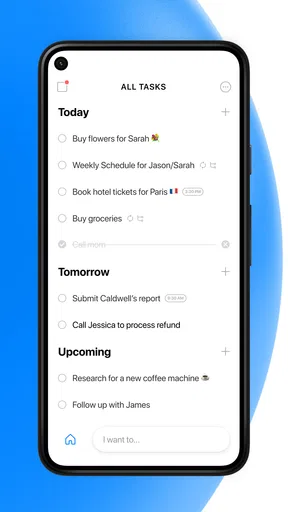
Setting up Any.do was a breeze. You start by downloading it from the App Store or Google Play, and within a few taps, you're in. The user interface is clean and intuitive, which is always a plus. You know those apps that require a PhD to navigate? Yeah, this isn't one of them. It’s straightforward, and you can start adding tasks right off the bat.
Features That Stand Out
Now, let’s dive into what really makes this app shine. First off, the task management features are top-notch. You can create tasks, set deadlines, and even add sub-tasks for those big projects that need breaking down. There's something satisfying about ticking off those little checkboxes, am I right?
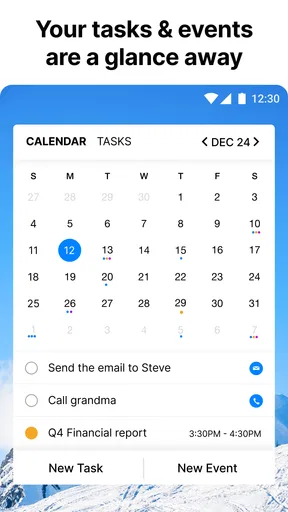
The calendar integration is seamless. I synced it with my Google Calendar, and it was like magic. All my appointments and reminders appeared right there, perfectly aligned with my tasks. It’s like having a personal assistant who never forgets anything!
Daily Planning
One feature I particularly love is the Daily Planner. Every morning, I get a little nudge to plan my day. It suggests tasks based on my priorities, and I can easily drag and drop them into a schedule that makes sense for me. It’s like organizing your day with a cup of coffee in hand.
Sharing is Caring
Another cool aspect is the ability to share tasks and lists. If you're working on a project with a team or planning a trip with friends, everyone can stay on the same page. No more "I thought you were bringing the snacks!" moments.
Voice Commands and Widgets
For those who like to keep it hands-free, the app supports voice commands. You can add tasks just by talking to your phone, which is perfect for those busy moments when typing is just too much effort. Plus, the home screen widgets let you see your tasks and calendar at a glance, saving you time and taps.
Why You Might Love It
If you're someone who appreciates a well-organized life, Any.do is a game-changer. The app is packed with features that cater to both individual users and teams. It’s great for anyone who wants to boost productivity without the hassle of managing multiple apps.
The premium version offers even more goodies, like recurring tasks and location-based reminders. But honestly, the free version is pretty robust and might be all you need.
Wrapping Up
In conclusion, Any.do - To do list & Calendar is more than just a task manager. It's a full-fledged productivity suite that's easy to use and packed with features that genuinely help you stay on top of things. Whether you're a student, a professional, or just someone who wants to keep their personal life organized, this app is worth a try.
So, if you're ready to take control of your schedule and make your to-do list your ally instead of your enemy, give Any.do a whirl. You'll wonder how you ever managed without it!
Pros
- Intuitive interface for easy task management.
- Seamless sync across devices ensures consistency.
- Built-in calendar integration boosts productivity.
- Customizable reminders to fit personal schedules.
- Collaboration features enhance team productivity.
Cons
- Limited free version features.
- Requires internet for full functionality.
- Occasional sync delays reported.
- Premium version can be pricey.
- Some users find notifications intrusive.
FAQs for Any.do - To do list & Calendar
What features does Any.do offer for task management?
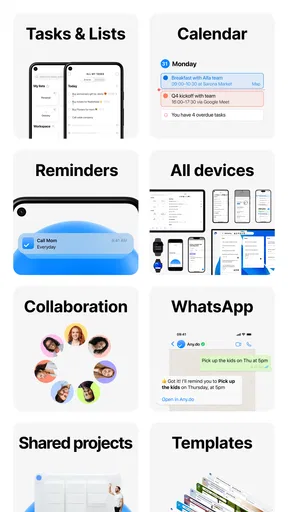
Any.do provides a comprehensive suite of features for task management, including a to-do list, calendar integration, reminders, and a daily planner. It allows users to organize tasks by category, set deadlines, and prioritize tasks. Additionally, the app supports collaboration, enabling users to share tasks and lists with others.
Is Any.do available on multiple platforms?
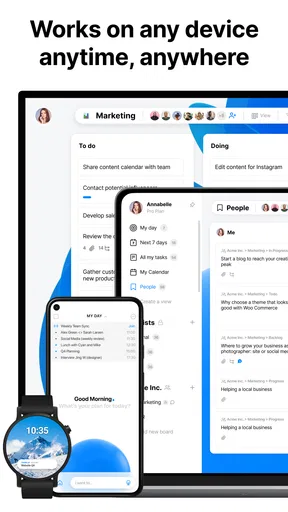
Yes, Any.do is available on multiple platforms, including Android, iOS, and web browsers. This cross-platform availability ensures that your tasks and calendar are synchronized across all your devices, allowing you to manage your schedule seamlessly whether you're on your phone, tablet, or computer.
How does Any.do integrate with other apps and services?
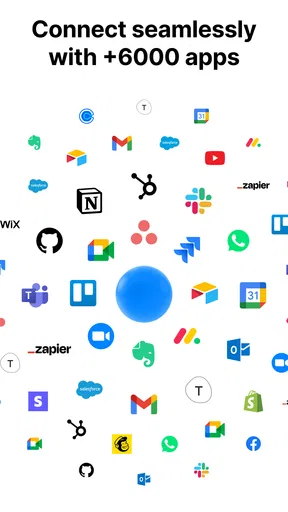
Any.do integrates with several popular apps and services to enhance productivity. Users can connect Any.do with calendars like Google Calendar and Outlook, as well as task automation services like Zapier. This integration allows for streamlined task management by syncing tasks and events across different platforms.
Is Any.do free to use, and are there premium features?
Any.do offers a free version with essential features for task management. However, for users who need more advanced tools, there is a premium subscription available. Premium features include additional customization options, location-based reminders, and an expanded set of integrations, providing a more robust productivity experience.
How secure is my data on Any.do?
Any.do takes data security seriously and implements measures to protect users' information. The app uses encryption to secure data and complies with privacy regulations. Users can feel confident that their tasks, notes, and personal information are safeguarded. It's always recommended to review their privacy policy for detailed information.


